FREE DOWNLOAD
Free sales pipeline template for Excel and Google Sheets
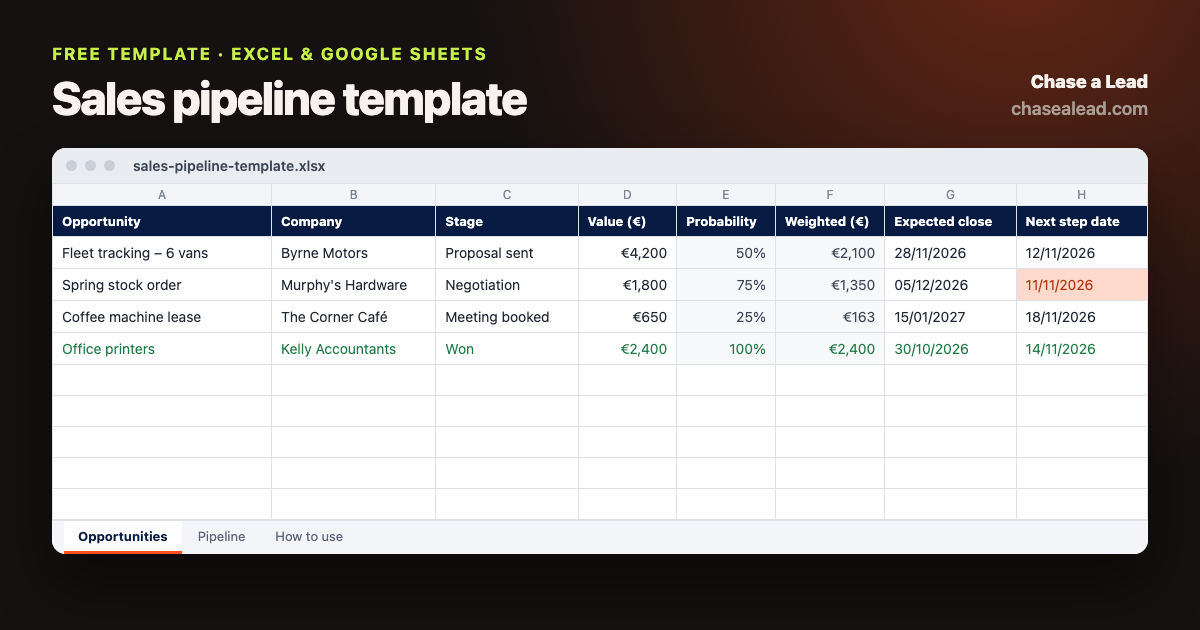
A sales pipeline spreadsheet that does the maths for you. Pick a stage and the win probability and weighted value fill themselves in; overdue next steps turn orange; and a pipeline tab shows value by stage, your win rate and what is likely to close over the next six months.
Free, no sign-up. Works in Excel, Google Sheets, Numbers and LibreOffice.
What is in the template
- Opportunities — one row per deal. Stage, county and dates are dropdowns or validated, so the totals stay accurate.
- Pipeline — deals, value and weighted value by stage; open pipeline value; weighted forecast; win rate; average deal size; next steps overdue and due today; and a forecast for each of the next six months by expected close date.
- How to use — six steps for anyone you share it with.
- Lists (hidden) — the stages, their win probabilities and all 26 counties.
The pipeline stages
Six stages cover most B2B and field sales. Each one carries a default probability of closing, which drives the weighted value and the forecast.
Stage
Probability
What it means
Qualified
10%
They have a need and could buy. No meeting yet.
Meeting booked
25%
A demo, visit or call is in the diary.
Proposal sent
50%
They have a price in writing.
Negotiation
75%
Discussing terms, quantities or timing — the deal is real.
Won
100%
Signed or paid. Drops out of the open pipeline.
Lost
0%
They said no or went quiet for good. Counts toward your win rate.
Default stages and win probabilities. Change them on the hidden Lists tab.
The columns
Column
What goes in it
Opportunity
A short name for the deal, e.g. “Fleet tracking – 6 vans”.
Company / Contact
Who you are selling to and who you deal with.
County
Dropdown of all 26 counties, to filter by territory.
Stage
Pick from the list. Drives probability and the summary.
Value (€)
What the deal is worth if you win it.
Probability
Fills in automatically from the stage.
Weighted value (€)
Value × probability. Fills in automatically.
Expected close
When you expect a decision. Turns orange if it passes on an open deal.
Next step / Next step date
The one thing that moves the deal forward, and when. Overdue turns orange.
Owner / Notes
Who is working it, and anything worth remembering.
Columns on the Opportunities tab
How to keep a pipeline honest
- 1.Every open deal has a next step and a date. A deal without one is not moving — it is waiting to be lost.
- 2.Move stages on evidence, not hope. A deal is at Proposal sent when they have the price in writing, not when you plan to send it.
- 3.Push the close date when it slips. An expected close date in the past is the template telling you the forecast is wrong.
- 4.Mark deals Lost. Your win rate is only useful if losses are recorded, and a shorter pipeline is easier to work.
- 5.Review it weekly. Fifteen minutes on a Friday — update stages, dates and next steps — is enough to keep it accurate.
The formulas, if you want to build your own
Probability is looked up from the stage, and weighted value multiplies it by the deal value:
=IFERROR(VLOOKUP(E2, Lists!$B$2:$C$7, 2, FALSE), "")
=IF(OR(F2="", G2=""), "", F2*G2)
The six-month forecast adds up open deals whose expected close date falls in each month:
=SUMIFS(Opportunities!$H$2:$H$501,
Opportunities!$I$2:$I$501, ">="&A22,
Opportunities!$I$2:$I$501, "<"&EDATE(A22, 1),
Opportunities!$E$2:$E$501, "<>Won",
Opportunities!$E$2:$E$501, "<>Lost")
Where the pipeline fits
The pipeline is the middle of the job. Before it, you need somewhere to put every new contact — the free sales lead tracker template does that. If your deals start on the phone, the sales call log shows how many calls it takes to fill the pipeline.
Your pipeline, in your pocket
Chase a Lead converts a lead into an opportunity with one tap and keeps it moving from new through proposal to won or lost — with the next follow-up on your Today list, not buried in a spreadsheet.
Frequently asked questions
What is a sales pipeline?
A sales pipeline is the list of deals you are actively working, each at a stage — such as meeting booked, proposal sent or negotiation — with a value and an expected close date. It shows how much business is in play and what needs to happen next to close it.
What is weighted pipeline value?
Weighted value is the deal value multiplied by the chance of winning it at its current stage. A €4,000 deal at proposal stage (50%) is weighted at €2,000. Adding up weighted values gives a more honest forecast than adding up every deal at full value.
Can I change the stage probabilities?
Yes. Unhide the Lists tab (right-click any tab, then Unhide) and edit the probability next to each stage. Every deal and the forecast recalculate. If you have a few months of results, set each probability to the share of deals at that stage you actually went on to win.
Does the pipeline template work in Google Sheets?
Yes. In Google Sheets choose File, then Import, then Upload, and select the Excel file. The stage dropdowns, highlighting and forecast formulas carry across.
Should I put every lead in my pipeline?
Use a lead tracker for everyone you might sell to, and move a lead into the pipeline once it is a real opportunity — a need, a rough value and a decision coming. Keeping early leads out of the pipeline stops it looking bigger than it is.
Run your pipeline from your phone
Chase a Lead is in private beta. Join the list and we'll email you once, when early access opens.
Free while we’re in beta. Unsubscribe in one click.
More free templates for sales reps
Sales lead tracker template
Track every lead with county and status dropdowns, overdue follow-up highlighting and an automatic pipeline summary.
Sales call log template
A cold calling tracker that logs every call and outcome, flags call backs and records NDD and consent checks.
Door-to-door sales tracker
A canvassing sheet for every door knocked, with answer and conversion rates and the 30-day cancellation window for sales.
Mileage log template for Ireland
A business mileage log that works out what each journey is worth at the Revenue civil service rates, band by band.